
Self-Hosted Dev Sandboxes with Docker and Go: Preview URLs Without Kubernetes
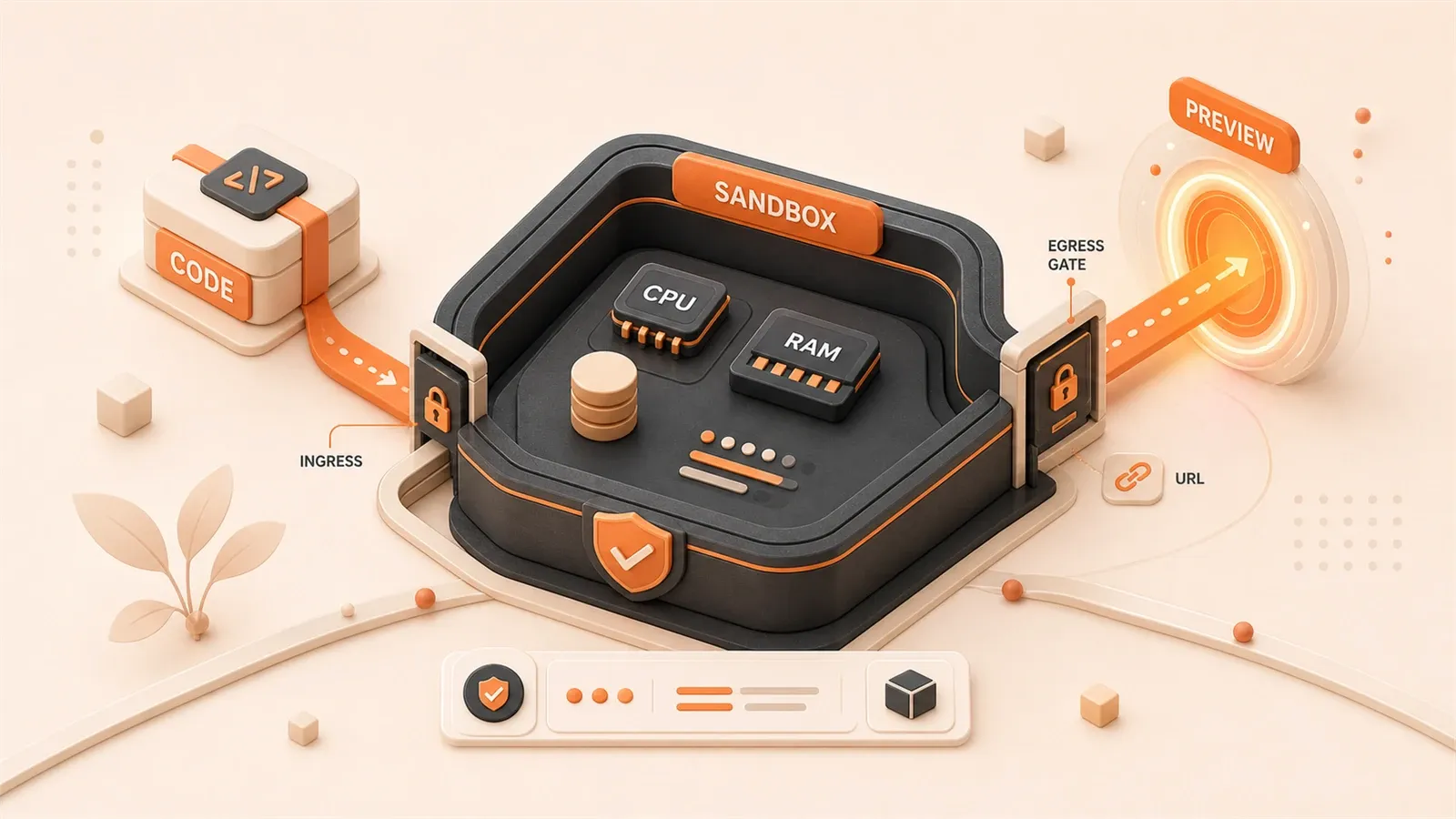
"The sandboxed README describes a Go control plane, Docker, Traefik, SQLite, preview URLs, idle stop, and production hardening boundaries."
"Docker resource-constraint documentation explains that containers do not have CPU or memory limits unless you configure them."
"Docker Sandboxes documentation uses microVMs, an independent Docker daemon, network isolation, and credential isolation as a stronger security model."
"Traefik's Docker provider can discover routing configuration from Docker labels and route requests with Host rules."
For every pull request, a separate preview environment is usually hosted on Vercel or Netlify. When cost, private-network data, or infrastructure ownership matters more, a single Docker host plus a Go control plane can cover the same early-stage need. Each sandbox gets its own preview URL, resources have limits, and the security boundary is explicit. No Kubernetes cluster, no multi-node scheduler.
Decision table: when to use which option
When a team asks for “self-hosted preview environments,” the first instinct is often a batch of docker run shell scripts, or the opposite move: jump straight to Kubernetes. Start with the decision table instead.
| Scenario | Recommended option | Why |
|---|---|---|
| Internal team with fewer than 10 concurrent previews, and the trust boundary stays inside the team | Single-host Docker + Go control plane | Resource density is manageable, the architecture stays simple, and you do not need to operate a Kubernetes cluster |
| Internal team with more than 20 concurrent previews, or a requirement for multi-node high availability | Kubernetes + Namespace isolation | One host will not be enough; you need scheduling across nodes and rollout primitives |
| External users or untrusted code execution, including autonomous agents | microVMs, such as Docker Sandboxes or Firecracker | A Docker socket effectively grants host-level power; do not mix it with untrusted workloads |
| Simple static previews with no persistence requirement | Shell script + random port | It can work, but the preview URL is not stable and you have no real resource or security boundary |
Use three checks.
Team size: a single host works best for roughly 10 concurrent internal previews. A practical estimate is 512 MB RAM plus 0.5 CPU per sandbox; a 16 GB host can carry about 20 sandboxes before the margin gets thin. Beyond that density, move to Kubernetes scheduling or split capacity with microVMs.
Trust boundary: internal teammates and trusted users can run inside Docker containers. If external strangers or autonomous agents execute arbitrary code, a Docker-socket design is not safe enough. Docker’s official Sandboxes use microVM isolation; each sandbox gets its own Docker daemon, filesystem, and network, which is a better fit when the host must not be trusted by the workload.
Upgrade path: start with single-host Docker to validate the product loop and resource density. When concurrency exceeds the single-host limit, or you need multi-node availability, move to Kubernetes. When the trust boundary changes from “internal team” to “external users,” move to microVMs.
The tastyeffectco/sandboxes README is clear about the target shape: a single-host Docker pattern for AI app builders, agent platforms, and coding playgrounds. It is not microVM-grade isolation; it is a Go control plane that creates containers on a single Docker host and exposes preview URLs.
Architecture breakdown: the core control-plane components
A single-host Docker preview environment is not just docker run in a loop. It needs a control plane that owns lifecycle, route registration, and cleanup. The tastyeffectco/sandboxes architecture breaks that into six modules.
Go control plane (sandboxd): it runs in a container and mounts the host Docker socket plus a data directory. It manages sandbox containers through the Docker CLI: create, start, stop, and delete. Sandbox metadata lives in SQLite as the source of truth.
Docker socket mount: this is the control plane’s entry point into the Docker daemon. By mounting /var/run/docker.sock, sandboxd can create and manage containers. This is also the main privilege boundary: once the socket is mounted, the control plane has broad host-level power.
Traefik labels registration: when a sandbox container starts, the control plane injects Traefik routing labels through Docker labels. Traefik acts as the reverse proxy, discovers routes from labels, and sends *.preview.example.com traffic to the right container.
SQLite metadata storage: each sandbox has a unique ID and directory. Metadata goes into SQLite. Workspaces live under SANDBOXED_DATA_DIR/workspaces/, with one subdirectory per sandbox for source code, config, and build artifacts.
Idle reaper and pressure reaper: the idle reaper checks when a sandbox has been inactive for too long and stops it to release RAM. The pressure reaper watches host memory pressure and stops selected sandboxes before the host reaches OOM. These reapers are the core resource-recovery mechanism.
Wake path: after the idle reaper stops a sandbox container, the first request to the preview URL has to wake it. A Traefik catch-all route forwards the request to the control plane; the control plane starts the container and returns a warming page until the app is ready.
The smallest useful version is: a Go control-plane container, a Docker socket mount, Traefik, SQLite, and an idle reaper. The local quick start still needs Docker Engine and the Compose plugin.
Preview URL implementation
The important part of a preview URL is a stable domain, not a random port. Each sandbox gets an independent {sandbox_id}.preview.example.com host name.
Traefik Docker provider configuration
Traefik can discover routing configuration from container labels through the Docker provider. A minimal configuration looks like this.
# traefik.yml
providers:
  docker:
    endpoint: "unix:///var/run/docker.sock"
    exposedByDefault: false
exposedByDefault: false means Traefik will only discover containers that explicitly opt in with labels.
Host rule and Docker labels
The control plane injects labels when it creates a sandbox container. For example:
labels:
  - "traefik.enable=true"
  - "traefik.http.routers.sandbox123.rule=Host(`sandbox123.preview.example.com`)"
  - "traefik.http.routers.sandbox123.entrypoints=websecure"
  - "traefik.http.services.sandbox123.loadbalancer.server.port=3000"
The Host rule sends requests for sandbox123.preview.example.com to that container. loadbalancer.server.port tells Traefik which internal container port the app listens on.
Wake-on-request path
After an idle reaper stops the sandbox container, the first request to the preview URL triggers the wake flow.
- DNS resolves to Traefik; this requires wildcard DNS such as
*.preview.example.com - Traefik sees the route for the sandbox, but the container is stopped
- A Traefik catch-all route forwards the request to the control plane’s wake handler
- The control plane starts the sandbox container and returns a warming page
- Once the container is ready, Traefik forwards later requests directly to the container
The catch-all router should have lower priority than all sandbox routers:
labels:
  - "traefik.http.routers.catch-all.rule=HostRegexp(`{subdomain:[a-z0-9-]+}.preview.example.com`)"
  - "traefik.http.routers.catch-all.priority=1"
  - "traefik.http.routers.catch-all.service=wake-service"
Requests that do not match a live sandbox route land on the catch-all, and the control plane handles wake logic.
Security boundary: Docker socket permissions
Mounting the Docker socket gives the control plane host-level power. That is the baseline security tradeoff of this architecture: it fits internal teams and trusted users, not untrusted code execution.
Docker socket risks
Docker’s own documentation warns that the daemon has an attack surface. If the Docker API is exposed insecurely, a remote non-root user may gain root-level access to the host. A container with /var/run/docker.sock mounted can use Docker CLI commands to create, modify, and delete containers. It can also reach host filesystems and networks through containers it creates.
That means:
- The control-plane container has broad permissions on the host
- Do not run the control plane on the same host as untrusted workloads
- Code inside sandbox containers can still indirectly affect the host if it can influence the control plane
Boundary for untrusted scenarios
Single-host Docker plus a Go control plane fits:
- Preview environments for internal team members
- Coding playgrounds for trusted users
- Internal validation environments for AI app builders or agent platforms
It does not fit:
- Arbitrary code execution from unknown external users
- Production autonomous-agent execution where the host is not trusted
- Multi-tenant platforms that require strong isolation
If the trust boundary changes from “internal team” to “external users,” move to Docker’s official Sandboxes or Firecracker-style microVMs. Docker Sandboxes provide hypervisor isolation, separate networking, an independent Docker daemon, an independent filesystem, and credential isolation. Each sandbox is a full microVM, not a container sharing the host Docker daemon.
Production hardening checklist
Before production, add these boundaries:
- Network isolation: run the control plane and sandbox containers on dedicated networks, not on the business network
- API authentication: local quick starts often have no authentication; production needs a token or another auth mechanism
- Minimum exposure: expose preview URLs through Traefik, not the Docker API port
- TLS: preview URLs should use a wildcard TLS certificate instead of plain HTTP
- Logs and monitoring: record control-plane API requests and container lifecycle events, then alert on unusual behavior
For stronger boundaries, compare gVisor, Firecracker, and Kubernetes approaches in an AI-agent sandbox design.
Resource limits: memory, CPU, and PIDs
Docker containers do not have resource limits by default. Without limits, a sandbox can consume host RAM and CPU and affect other sandboxes and host processes. A multi-tenant preview environment needs hard per-container limits.
Docker default behavior
Docker’s documentation explains that containers can use host resources as allowed by the kernel scheduler. Unless you explicitly set --memory or --cpus, a container can take available host resources.
Hard memory limit
--memory sets the maximum memory available to the container. For example:
docker run --memory="512m" --memory-swap="512m" sandbox-image--memory-swap sets the combined memory plus swap limit. When --memory-swap equals --memory, the container does not use swap.
If the container exceeds its memory limit, the OOM killer may terminate container processes. A host-level OOM can also affect other containers and host processes.
CPU share limit
--cpus sets how much CPU capacity a container can use. For example:

docker run --cpus="0.5" sandbox-imageThe container can use at most half a CPU core. When many sandboxes run concurrently, CPU limits prevent one container from taking all compute capacity.
Process count limit
--pids-limit helps prevent fork bombs. For example:
docker run --pids-limit=100 sandbox-imageThe container can create at most 100 processes. After that, fork() fails.
Compose configuration example
With Docker Compose, configure limits under deploy.resources.limits:
services:
  sandbox:
    image: sandbox-image
    deploy:
      resources:
        limits:
          cpus: "0.5"
          memory: 512M
          pids: 100
Compose deploy.resources applies in Docker Swarm mode. On a single Docker host, pass --memory, --cpus, and --pids-limit manually, or run docker-compose --compatibility.
The control plane should inject these limits when it creates sandbox containers instead of relying on users to configure them by hand.
Operations: image cache and Docker Hub rate limits
When many sandboxes are created and destroyed frequently, image pulls become a bottleneck. Docker Hub has pull rate limits and abuse rate limits, and the exact policy changes by account type and plan. Production should not rely on pulling every sandbox image from the public Docker Hub path every time.
Docker Hub limits
Docker’s documentation explains that anonymous users, authenticated users, and team accounts have different pull-rate policies. When you exceed the limit, pull requests are rejected. Check Docker Hub usage and limits for the current policy instead of hardcoding numbers.
In multi-sandbox environments, this matters because:
- Frequent sandbox creation may pull an image for every start
- A sandbox restarted after idle cleanup may need the image again
- Multiple sandboxes can repeatedly pull the same image
Image pre-warming and cache strategy
Production needs a few countermeasures.
Image pre-warming: pull common images to the host before the control plane starts. This reduces wait time when a sandbox starts.
Private registry: push common images to a private registry such as Harbor, AWS ECR, or Google Artifact Registry. The control plane pulls from the private registry instead of Docker Hub.
Docker Hub login: if you must pull from Docker Hub, use an authenticated account to get the appropriate pull allowance. Docker recommends logging in for production rather than relying on anonymous pulls.
Image cache: the Docker daemon already caches pulled image layers. If sandbox containers are deleted and recreated frequently, make sure cleanup jobs do not remove useful layers too aggressively.
Internal registry acceleration
If the host sits inside a private network, configure registry mirrors or proxies for Docker pull timeouts. Treat this as part of the platform, not as an afterthought after the first outage.
Troubleshooting checklist: preview URL cannot be reached
When a preview URL does not open, check these five points in order.
1. Does DNS point to Traefik?
Check the wildcard DNS record. The A record or CNAME for *.preview.example.com should point to the host that runs Traefik.
Use dig or nslookup:
dig sandbox123.preview.example.comThe returned IP should be the Traefik host IP, not another address.
2. Did Traefik discover the container labels?
Check the Traefik Docker provider configuration and the container labels.

Use the Traefik dashboard or logs:
docker logs traefik-container | grep "sandbox123"Traefik logs should show that it discovered the route for sandbox123. If not, check:
- Whether the
traefik.enable=truelabel exists - Whether
exposedByDefault: falseis configured correctly - Whether Traefik has the Docker socket mounted correctly
3. Is the container running?
Check the sandbox container status.
Use docker ps:
docker ps | grep sandbox123If the container is stopped, the idle reaper may have stopped it, or the wake path failed to restart it. Visiting the preview URL should make the control-plane wake handler start the container and return a warming page. If that path fails, check the control-plane logs.
4. What address does the app listen on?
Check the address and port inside the container.
Enter the container and inspect listening ports:
docker exec sandbox123 netstat -tulnThe app should listen on 0.0.0.0:3000, not only on 127.0.0.1:3000. Docker’s documentation notes that ports bound to 127.0.0.1 or ::1 are only reachable from the Docker host, so external requests cannot reach the app.
If the app listens only on localhost, change the app configuration or run the container with the appropriate networking mode.
5. Does the port binding match?
Compare the Traefik service port with the port the app actually listens on.
The Traefik label might say:
- "traefik.http.services.sandbox123.loadbalancer.server.port=3000"The app inside the container should listen on port 3000. If Traefik points at 3000 but the app listens on 8080, requests will fail.
When the ports do not match, fix the Traefik labels or the app configuration.
Conclusion
Single-host Docker plus a Go control plane can support a self-hosted preview environment: every sandbox gets its own preview URL, resources are bounded, and the security tradeoff is explicit. The fit is narrow: internal teams, trusted users, and small-scale concurrency. When the trust boundary expands to external strangers, or when concurrency exceeds one host, move to microVMs or Kubernetes.
The core modules are straightforward: the decision table keeps the scope honest; the control plane, Traefik, SQLite, and reapers explain the moving parts; preview URLs rely on Traefik Host rules and Docker labels; the security section treats the Docker socket as host-level power; resource limits are the baseline for multi-tenant use; image caching reduces Docker Hub risk; and the troubleshooting checklist gives you a path when preview URLs break.
Next steps:
- Small internal team previews: start with single-host Docker plus a Go control plane and measure resource density
- External users or high-risk workloads: move to Docker Sandboxes, Firecracker, or another microVM boundary
- Self-hosted CI runner: read the GitHub Actions self-hosted runner guide to build the rest of the private infrastructure
- Apps inside the preview environment: read the Next.js Docker self-hosting guide to run the app inside the sandbox
Build a self-hosted Dev Sandbox MVP
A practical path from a single Docker host to an internal preview environment with resource limits and access controls.
⏱️ Estimated time: 4 hr
- 1
Step 1: Choose the right isolation model
Use single-host Docker for trusted teams and small preview workloads. Use microVMs, separate hosts, or Kubernetes when users or code are not trusted. - 2
Step 2: Prepare the control plane
Run a small Go service that owns sandbox metadata, lifecycle operations, reapers, and wake-on-request logic. - 3
Step 3: Configure Traefik discovery
Enable the Docker provider with `exposedByDefault: false`, then inject labels only for sandbox containers that should receive traffic. - 4
Step 4: Assign stable preview URLs
Use wildcard DNS such as `*.preview.example.com`, then route each `{sandbox_id}.preview.example.com` host to the container port that serves the app. - 5
Step 5: Persist workspaces
Store each sandbox under `SANDBOXED_DATA_DIR/workspaces/` or an equivalent host directory so `docker stop` does not delete user files. - 6
Step 6: Add resource limits
Set memory, CPU, and PID limits on every sandbox. A single runaway build should not be able to starve the host. - 7
Step 7: Secure production entry points
Do not expose the Docker API. Add API authentication, TLS, preview-link access control, network separation, and lifecycle audit logs. - 8
Step 8: Plan image and registry operations
Pre-pull common images, log in to Docker Hub when needed, and use a private registry or cache for high-frequency sandbox creation.
FAQ
How is a Dev Sandbox different from regular Docker Compose?
Why not use Kubernetes from the start?
Can Docker container isolation run arbitrary code from strangers?
Does a preview URL need HTTPS?
Will files disappear after an idle sandbox stops?
Can Docker Hub rate limits affect this setup?
13 min read · Published on: Jun 5, 2026 · Modified on: Jul 14, 2026

Docker: Setup, Networking, Errors, and Production
If you landed here from search, the fastest way to build context is to jump to the previous or next post in this same series.
Previous
Code 137 Docker and Exit Status 1: Complete Troubleshooting Guide for Containers Exiting Immediately
Seeing cannot start docker compose application reason: exit status 1 or code 137 docker errors? Use this 4-step process to diagnose logs, OOM kills, path issues, and dependency startup failures.
Part 37 of 38
Next
This is the latest post in the series so far.


Comments
Sign in with GitHub to leave a comment