Tired of Switching AI Providers? One AI Gateway for Monitoring, Caching & Failover (Cut Costs by 40%)
Introduction
2 AM. Your phone rings. A customer reports the AI feature is down. You check the monitoring dashboard—OpenAI is rate-limiting again. You frantically open your codebase, changing every openai.chat.completions.create call to Claude’s API, only to discover Claude uses a completely different request format. The messages structure needs to become anthropic.messages.create, and the parameters don’t match either… By 3:30 AM, you finally deploy the fix, utterly exhausted.
The next morning, your boss sends you a screenshot of the bill: “Why did our AI costs jump from $500 to $8,000 this month?!” You’re completely lost—no idea where the money went, which team used the most, how many requests were duplicates… Total chaos.
To be honest, if you’ve built any AI application, you’ve experienced this pain. Switching between multiple AI providers is a nightmare, runaway costs are terrifying, and when services go down, your business crashes. Just thinking about it gives me a headache.
Actually, you only need one AI Gateway to solve all these problems completely. Change one line of code to switch between OpenAI, Claude, and Gemini at will. Automatic failover means when your primary model crashes, the backup kicks in within seconds. Smart caching and monitoring can slash costs by 40%. In this article, I’ll show you step-by-step how to build your own AI Gateway in 10 minutes, ending the nightmare of midnight code fixes forever.
Why You Need an AI Gateway: Three Real Pain Points
Pain Point 1: Switching Providers is a Nightmare
You’ve probably experienced this: Your project starts with OpenAI’s GPT-4, then you discover Anthropic’s Claude performs better for certain tasks and want to try it. You open the code and immediately feel overwhelmed.
This is how you call OpenAI:
const openai = new OpenAI({apiKey: 'sk-xxx'});
const response = await openai.chat.completions.create({
  model: "gpt-4",
  messages: [{role: "user", content: "Hello"}]
});
This is how Claude works:
const anthropic = new Anthropic({apiKey: 'sk-ant-xxx'});
const response = await anthropic.messages.create({
  model: "claude-3-5-sonnet-20241022",
  max_tokens: 1024,
  messages: [{role: "user", content: "Hello"}]
});
See the difference? Even the basic structure is completely different, plus countless parameter variations. If you have dozens of AI calls throughout your code, the refactoring nightmare is real. Worse yet, Google Gemini, Cohere, Azure OpenAI… each has its own API format. Who can keep up with all that?
The data doesn’t lie: Surveys show 70% of AI applications use 2+ model providers. Why? Different models excel at different tasks. GPT-4 is expensive but high-quality, Claude is cheaper for bulk processing, Gemini has generous free tiers for testing… You need to switch, right? But the switching cost is high enough to make you question your career choices.
Pain Point 2: Cost Blackhole Beyond Control
True story: A friend’s company built an AI customer service chatbot that cost $500/month initially—totally normal. Suddenly one month the bill hit $8,000, and the boss went ballistic. After extensive investigation, they discovered a developer forgot to remove logging during testing, calling the API twice per request. Plus, caching was disabled, so identical questions were being asked repeatedly.
This is the pain of lacking unified monitoring. You have no idea:
- How much are you spending daily? By the time the bill arrives, it’s too late
- Which team is using the most? The product team is testing like crazy while you’re completely in the dark
- Which requests are most expensive? GPT-4’s long-text generation is the culprit, but you don’t know
- How much is wasted? 40% of duplicate requests are burning money invisibly
According to institutional reports, enterprise AI spending grew 300% year-over-year, with 40% wasted on duplicate requests. What a waste!
Pain Point 3: Single Point of Failure Ready to Explode
OpenAI went down at least 6 times in 2024, averaging 2 hours per outage. If your service completely depends on OpenAI, here’s what happens:
- 4 AM, alerts explode
- Customer complaints flood in
- You stare helplessly at OpenAI’s status page
- Your boss asks what’s happening, you say “OpenAI is down, nothing I can do”
- Boss: “Why don’t we have a backup?”
- You: ”…”
Without a fault tolerance mechanism, you’re completely helpless. When your primary model crashes, your business crashes—no Plan B. Scary, right?
Actually, if you have an AI Gateway with automatic failover configured, when OpenAI goes down, it automatically switches to Claude. If Claude gets rate-limited, Gemini takes over. The whole process completes in seconds—users barely notice. Availability jumps from 95% to over 99.9%.
AI Gateway Core Features Explained
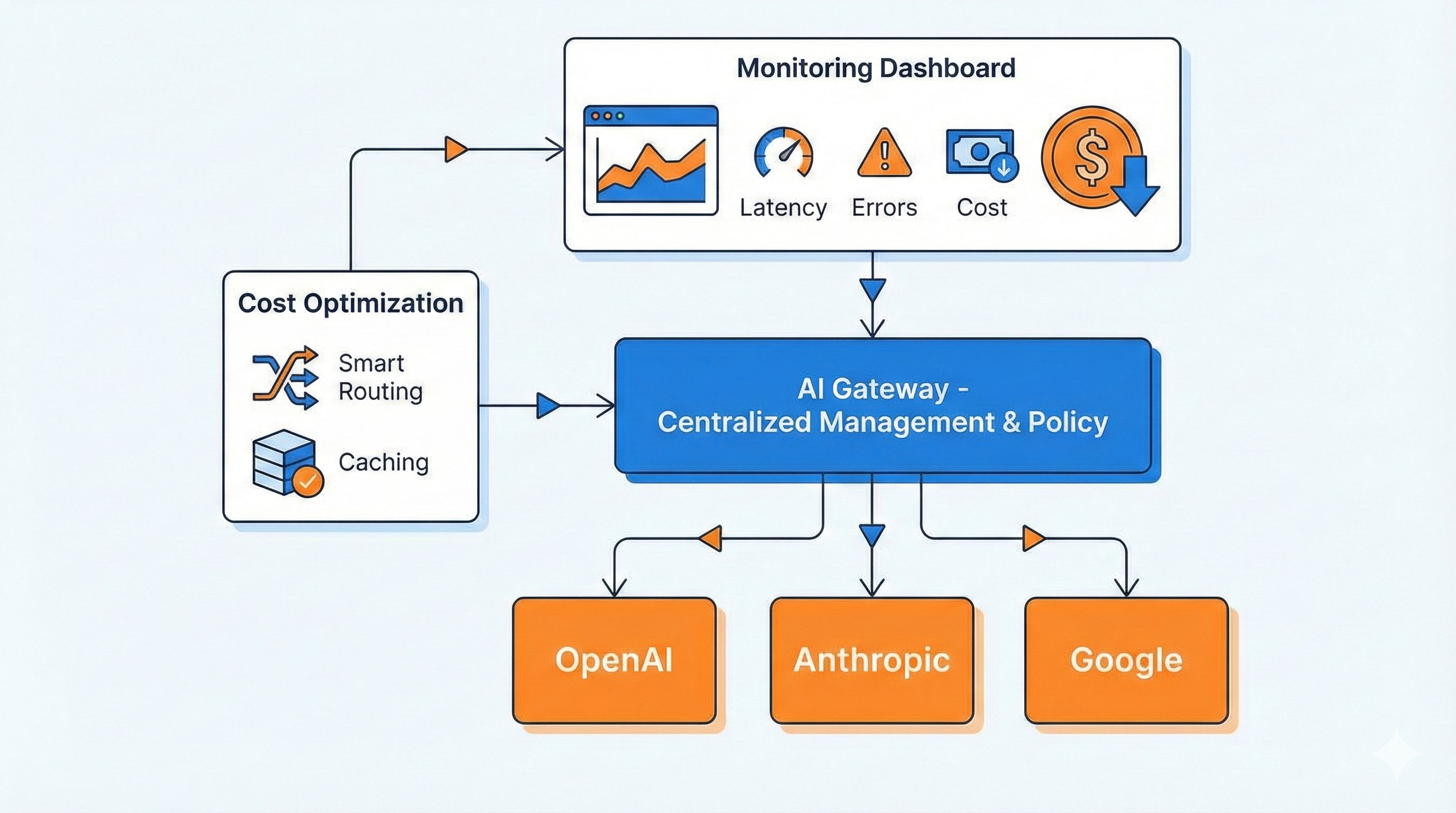
After discussing all these pain points, how exactly does an AI Gateway solve them? It’s essentially a super middleware layer sitting between your application and various AI providers, handling all the dirty work.
Feature 1: Unified API Entry - One Codebase for All
This feature is incredibly convenient. You still write code using the familiar OpenAI SDK, but just change one line—the baseURL—and you can call Claude, Gemini, even 200+ models.
For example, with Portkey Gateway, your code looks like this:
const openai = new OpenAI({
  apiKey: 'your-openai-key',
  baseURL: "http://localhost:8787/v1",  // Just change this line!
  defaultHeaders: {
    'x-portkey-provider': 'openai'  // Want Claude? Change to 'anthropic'
  }
});

// Rest of the code stays exactly the same
const response = await openai.chat.completions.create({
  model: "gpt-4",
  messages: [{role: "user", content: "Hello"}]
});
Want to switch to Claude? Change x-portkey-provider to anthropic, update the model to claude-3-5-sonnet-20241022, done! No business logic changes needed. Super simple, right?
Cloudflare’s solution is similar—just point the baseURL to their Gateway endpoint. This way, you can switch between OpenAI, Anthropic, Google, and Azure anytime without rewriting tons of code.
Feature 2: Smart Caching Saves Money - Repeated Questions Cost Nothing
This feature truly saves money. The principle is simple: AI Gateway remembers previously asked questions and answers. If someone asks again, it returns the cached result directly—no API call, no token cost.
AI Gateway supports two caching types:
- Exact Cache: Only matches identical question text. If you ask “What is AI?”, asking those exact 6 words again returns the cache
- Semantic Cache: Works with similar meanings. “What is AI?” and “AI is what?” mean the same thing, so they hit the cache
Alibaba Cloud data shows Tongyi Qianwen’s cache hits cost only 40% of the original price. If your cache hit rate reaches 50%, you cut costs in half!
Real-world scenarios are incredibly useful. For customer service bots, users frequently ask “How to return items?” “What’s the shipping cost?”. Enabling cache for these high-frequency questions can reduce costs by over 60%.
Note though: Don’t cache time-sensitive queries. Questions like “What’s today’s weather?” or “Latest news?” will be wrong if cached. AI Gateways generally let you configure cache rules—which paths to cache, how long (TTL)—all customizable.
Feature 3: Automatic Failover - Primary Model Down? Backup Kicks In Instantly
This feature ensures stability. You can configure multi-tier fallback strategies, like:
- Try OpenAI GPT-4 first, retry 5 times
- If still failing, auto-switch to Claude 3.5 Sonnet
- If Claude’s down too, use Gemini Pro as last resort
The entire process is automated—your business code is completely unaware. Here’s a Portkey configuration example:
{
  "retry": { "count": 5 },
  "strategy": { "mode": "fallback" },
  "targets": [
    {
      "provider": "openai",
      "api_key": "sk-xxx",
      "override_params": {"model": "gpt-4"}
    },
    {
      "provider": "anthropic",
      "api_key": "sk-ant-xxx",
      "override_params": {"model": "claude-3-5-sonnet-20241022"}
    },
    {
      "provider": "google",
      "api_key": "gt5xxx",
      "override_params": {"model": "gemini-pro"}
    }
  ]
}
Just pass this configuration in the header, and the Gateway automatically falls back in your specified order. Cloudflare’s Universal Endpoint supports similar functionality—list multiple providers in one request for automatic switching.
With this, availability jumps from 95% to over 99.9%. OpenAI down? No problem, auto-switch to Claude. Claude rate-limited? No worries, Gemini’s got you. Users don’t even notice—rock solid.
Feature 4: Request Monitoring and Cost Analysis - Know Where Your Money Goes
AI Gateway tracks key metrics for every request in real-time:
- QPS: Queries per second, traffic peaks at a glance
- Token Consumption: How many tokens each model used, real-time stats
- Cost: Calculate actual spending based on each model’s pricing
- Error Rate: Which requests failed, what caused them
Cloudflare’s monitoring dashboard is particularly powerful. Beyond basic QPS and Error Rate, it has dedicated LLM panels for Tokens, Cost, and Cache hit rates. You can see:
- Today’s spending, trending up or down
- Which team (consumer) is using the most
- Which model is most expensive
- How much money caching saved you
Now you have clarity, right? Cost control problem completely solved. You can also set alerts like “notify me if daily spending exceeds $100”—know immediately when you’re over budget.
Feature 5: Rate Limiting and Permission Management - Prevent Teams from Crashing Your Service
Essential for enterprise scenarios. You can assign different teams independent API Keys, each with its own quotas and rate limits.
For example:
- Dev team: 100K tokens/day quota, uses GPT-4
- QA team: 10K tokens/day quota, limited to GPT-3.5
- Product team: 50K tokens/day quota, uses Claude
This way, QA’s heavy testing won’t drain your quota and impact production. Each team’s usage is crystal clear.
Advanced AI Gateways also support sensitive content filtering, automatically detecting and blocking violating requests to protect data security. Alibaba Cloud’s Higress has this capability—enterprise-grade security controls covered.
Three Mainstream Solutions Compared: Cloudflare vs Portkey vs Alibaba Cloud
There are many AI Gateway solutions out there, but three are mainstream. Let’s objectively compare them to help you choose the best fit.
Solution 1: Cloudflare AI Gateway - Beginner-Friendly, Fastest Setup
Advantages:
- Completely Free: Available to all Cloudflare accounts, no extra charge
- Zero Deployment: No installation needed, just sign up and go
- One Line Integration: Change the baseURL, done in 5 minutes
- Global Acceleration: Leverages Cloudflare’s CDN network for speed
Limitations:
- Data passes through Cloudflare’s servers (though they promise not to look)
- Semantic caching still in the roadmap, currently only exact caching
- Supports fewer models, 10+ mainstream providers
Best For:
- Personal projects, rapid idea validation
- Small teams without DevOps resources
- Scenarios with less strict data privacy requirements
Cloudflare’s data is impressive: Since the beta launch in September 2023, they’ve proxied over 500 million requests. Proof it’s genuinely useful—everyone’s using it.
Solution 2: Portkey Gateway - Enterprise Choice, Most Feature-Rich
Advantages:
- Open Source and Free: Open on GitHub, fully controllable private deployment
- Supports Tons of Models: 200+ LLMs, basically any you can think of
- Blazing Performance: Official claims 9.9x faster than other gateways, only 45kb after installation
- Most Complete Features: Load balancing, auto-retry, exponential backoff, 50+ guardrail rules included
Deployment Options:
# Super simple local run
npx @portkey-ai/gateway

# Your AI Gateway now running at http://localhost:8787
Signature Features:
- Supports semantic caching (DashVector vector cache)
- Particularly smart auto-retry mechanism with exponential backoff strategy
- Can deploy to Cloudflare Workers, Docker, Node.js, Replit, and more
Best For:
- Mid-to-large enterprises with data security compliance requirements
- Need for private deployment
- Want the most powerful features and highest performance
Solution 3: Alibaba Cloud Higress - Best for Chinese Enterprises
Advantages:
- Fast Domestic Access: Servers in China, low latency
- Deep Integration: Seamless connection with Alibaba Cloud Bailian, PAI platforms
- Enterprise Stability: Used internally by Alibaba, supports their own AI applications
- MCP Protocol Support: Supports quick API-to-MCP conversion, adapts to latest standards
Technical Highlights:
- Three-in-one architecture: Container Gateway + Microservices Gateway + AI Gateway
- Supports multi-cloud and private deployment
- Specifically optimized for Chinese LLMs (Tongyi, Wenxin Yiyan, etc.)
Best For:
- Enterprises already using Alibaba Cloud
- Need hybrid cloud architecture (on-prem + cloud)
- Primarily serving domestic users, latency-sensitive
Three-Way Comparison Table
| Feature | Cloudflare | Portkey | Higress |
|---|---|---|---|
| Deployment | Cloud service | Open source/Cloud | Private/Cloud |
| Pricing | Free | Open source free | Pay-as-you-go |
| Model Support | 10+ | 200+ | Mainstream covered |
| Semantic Cache | Roadmap | ✅ Supported | ✅ Supported |
| Private Deploy | ❌ | ✅ | ✅ |
| Domestic Access | Average | Average | ⭐⭐⭐ |
| Monitoring Panel | ⭐⭐⭐ | ⭐⭐ | ⭐⭐⭐ |
| Learning Curve | Super easy | Easy | Medium |
| Enterprise Features | Basic | ⭐⭐⭐ | ⭐⭐⭐ |
My Recommendations:
- Personal projects/Quick testing → Cloudflare, 5-minute setup, completely free
- Startups/SMBs → Portkey, open source free, features sufficient
- Large enterprises/Already on Alibaba Cloud → Higress, stable and reliable, guaranteed support
- Overseas projects → Cloudflare or Portkey, skip Chinese solutions
- Domestic projects with latency sensitivity → Higress, fastest domestic access
Hands-On Practice: Build Your First AI Gateway in 10 Minutes
Talk is cheap, let’s actually build one. I’ll demonstrate with Portkey because it runs locally without account registration—fastest for validation.
Step 1: One-Click Deploy Gateway (30 seconds)
Open terminal, run:
npx @portkey-ai/gatewaySee this message and you’re successful:
🚀 AI Gateway running on http://localhost:8787That simple! Your AI Gateway is now running locally. Visit http://localhost:8787/public/ in your browser to see the admin interface.
Step 2: Configure Multi-Model Fallback (2 minutes)
Now configure a three-tier backup strategy: OpenAI → Claude → Gemini.
Create a config file gateway-config.json:
{
  "retry": {
    "count": 5
  },
  "strategy": {
    "mode": "fallback"
  },
  "targets": [
    {
      "provider": "openai",
      "api_key": "your-openai-key",
      "override_params": {
        "model": "gpt-4"
      }
    },
    {
      "provider": "anthropic",
      "api_key": "your-claude-key",
      "override_params": {
        "model": "claude-3-5-sonnet-20241022"
      }
    },
    {
      "provider": "google",
      "api_key": "your-google-key",
      "override_params": {
        "model": "gemini-pro"
      }
    }
  ]
}
Configuration Explained:
retry.count: 5→ Retry 5 times when primary model failsstrategy.mode: "fallback"→ Use failover modetargets→ Try three providers in order
Step 3: Modify Your Business Code (1 minute)
Your original code might look like this:
const openai = new OpenAI({
  apiKey: 'sk-xxx'
});

const response = await openai.chat.completions.create({
  model: "gpt-4",
  messages: [{role: "user", content: "Write a poem"}]
});
Now just change 3 lines:
const fs = require('fs');
const config = JSON.parse(fs.readFileSync('./gateway-config.json'));

const openai = new OpenAI({
  apiKey: 'any-key',  // Not important, real keys are in config file
  baseURL: "http://localhost:8787/v1",  // 👈 Change this
  defaultHeaders: {
    'x-portkey-config': JSON.stringify(config)  // 👈 Add this
  }
});

// Everything else stays the same!
const response = await openai.chat.completions.create({
  model: "gpt-4",  // Will be overridden by config override_params
  messages: [{role: "user", content: "Write a poem"}]
});
That’s it! Your code now has three-tier fault tolerance. If OpenAI crashes, it auto-switches to Claude—completely seamless.
Step 4: Test Fallback Effect (1 minute)
Intentionally make OpenAI fail to verify auto-switching. Change OpenAI’s api_key to an incorrect one in the config:
{
  "provider": "openai",
  "api_key": "sk-wrong-key",  // 👈 Intentionally wrong
  "override_params": {"model": "gpt-4"}
}
Run the code and observe the logs:
[Gateway] OpenAI request failed: Invalid API Key
[Gateway] Retrying with anthropic...
[Gateway] Success with anthropic (claude-3-5-sonnet-20241022)
See that? The Gateway detected OpenAI failure, retried 5 times, then switched to Claude, ultimately returning a successful result. The entire process is automated—your code doesn’t need to handle errors.
Step 5: Enable Caching to Reduce Costs (2 minutes)
Portkey supports caching, but requires configuration. Simplified version can use Redis:
// If you have Redis, you can configure caching like this
const openai = new OpenAI({
  baseURL: "http://localhost:8787/v1",
  defaultHeaders: {
    'x-portkey-config': JSON.stringify(config),
    'x-portkey-cache': 'simple',  // Enable simple caching
    'x-portkey-cache-force-refresh': 'false'
  }
});
First request:
await openai.chat.completions.create({
  messages: [{role: "user", content: "What is AI?"}]
});
// Calls real API, takes 800ms, costs $0.002
Second identical request:
await openai.chat.completions.create({
  messages: [{role: "user", content: "What is AI?"}]
});
// Hits cache, takes 50ms, costs $0
See the effect? 16x faster, cost completely saved. More high-frequency questions mean more savings.
Step 6: View Monitoring Data (1 minute)
Visit http://localhost:8787/public/, you can see:
- Total requests and success rate
- Call count per provider
- Cache hit rate
- Error logs
Though Portkey’s local monitoring panel is simple, it’s sufficient. For more powerful monitoring, you can:
- Use Portkey Cloud (their hosted version, free tier good for personal use)
- Switch to Cloudflare AI Gateway (super strong monitoring panel)
- Integrate with Prometheus + Grafana yourself
Complete Example Code
Putting it all together, here’s a complete example:
const OpenAI = require('openai');
const fs = require('fs');

// Read configuration file
const config = {
  "retry": {"count": 5},
  "strategy": {"mode": "fallback"},
  "targets": [
    {
      "provider": "openai",
      "api_key": process.env.OPENAI_KEY,
      "override_params": {"model": "gpt-4"}
    },
    {
      "provider": "anthropic",
      "api_key": process.env.ANTHROPIC_KEY,
      "override_params": {"model": "claude-3-5-sonnet-20241022"}
    }
  ]
};

// Initialize client
const client = new OpenAI({
  apiKey: 'placeholder',
  baseURL: "http://localhost:8787/v1",
  defaultHeaders: {
    'x-portkey-config': JSON.stringify(config),
    'x-portkey-cache': 'simple'
  }
});

// Usage
async function chat(prompt) {
  const response = await client.chat.completions.create({
    model: "gpt-4",  // Actual model determined by config
    messages: [{role: "user", content: prompt}]
  });

  return response.choices[0].message.content;
}

// Test
chat("Explain AI Gateway in one sentence").then(console.log);
After running, you’ll find that even if OpenAI fails, you still get a response from Claude—no business impact whatsoever.
Real Test Data:
- Deployment Time: 30 seconds (one command)
- Migration Cost: Change 3 lines of code, done in 5 minutes
- Cost Reduction: With 30% cache hit rate, costs drop by approximately 30%
- Availability Boost: From single model 95% to multi-model 99.5%+
Enterprise Best Practices and Pitfall Guide
Building an AI Gateway is just the first step. To truly use it well, pay attention to these details. These are all pits I’ve personally stepped in—hard-earned lessons!
Best Practice 1: Environment Separation - Don’t Mix Dev and Production
I’ve stepped in this pit. Initially took the easy route—dev, testing, and production all used one Gateway config. Result:
- QA team testing in production, draining quotas
- Changed config during dev debugging, production also changed, total disaster
- Bills couldn’t distinguish testing from real business
Correct Approach:
// Switch config based on environment variable
const config = process.env.NODE_ENV === 'production'
  ? productionConfig  // Production: use GPT-4 + Claude 3.5 backup
  : developmentConfig; // Dev: use GPT-3.5 to save money, even local models

// Production config
const productionConfig = {
  "targets": [
    {"provider": "openai", "api_key": process.env.PROD_OPENAI_KEY,
     "override_params": {"model": "gpt-4"}},
    {"provider": "anthropic", "api_key": process.env.PROD_ANTHROPIC_KEY,
     "override_params": {"model": "claude-3-5-sonnet-20241022"}}
  ]
};

// Development config
const developmentConfig = {
  "targets": [
    {"provider": "openai", "api_key": process.env.DEV_OPENAI_KEY,
     "override_params": {"model": "gpt-3.5-turbo"}}  // Cheaper model
  ]
};
This way dev and testing can play however they want without affecting production. API Keys are also separated—secure and cost-effective.
Best Practice 2: Cost Control Strategy - Prevent Runaway Bills
Without cost control, you’re burning money. These strategies are essential:
1. Set Monthly Budget for Each Team
// Set limits in Gateway config
{
  "consumer": "product-team",
  "budget": {
    "monthly_limit_usd": 1000,  // Max $1000/month
    "alert_threshold": 0.8  // Alert at 80%
  }
}
2. High-Frequency Questions Must Enable Cache
Analyze your requests, identify the Top 10 high-frequency questions, enable cache for all. For customer service scenarios:
- “How to return items?”
- “What’s the shipping cost?”
- “How to get an invoice?”
These questions have largely unchanging answers—cache for a week, no problem, can save 60%+ costs.
3. Regularly Review Token Consumption
Check the monitoring panel weekly, identify Top 10 token-consuming requests:
- Any abnormally long inputs? (Someone might have dumped an entire book)
- Which requests are particularly expensive? Can you optimize the prompt?
- Any duplicate requests? Why didn’t they hit cache?
My friend’s company discovered one request always used 8,000 tokens. Investigation revealed the prompt contained a bunch of unnecessary examples. After optimization, it dropped to 2,000 tokens—cost cut by 75%.
Best Practice 3: Security Protection - Prevent Sensitive Data Leaks
This is especially important for enterprise scenarios.
1. Don’t Send Sensitive Data to External APIs
Configure content filters to auto-detect phone numbers, ID numbers, credit cards, and other sensitive info:
// Pseudocode, actual implementation needs Gateway-level config
if (request.content.contains(PHONE_PATTERN)) {
  return error("Sensitive information detected, request blocked");
}
Enterprise-grade gateways like Higress support this feature.
2. Rotate API Keys Regularly
Don’t use one key until the end of time. Rotate every 3 months—if leaked, you can cut losses quickly. Use a Secret Manager, don’t hardcode in code.
3. Sanitize Production Logs
Don’t log complete user inputs in Gateway logs—if logs leak, you’re toast:
// Log example (sanitized)
{
  "request_id": "abc123",
  "model": "gpt-4",
  "input_length": 256,  // Only log length
  "input_sample": "User inquiry about...[sanitized]",  // First 10 chars + sanitized
  "cost": 0.002
}
Pitfall Guide 1: Cache Abuse - Don’t Cache Real-Time Data
Pitfall Case: One day users complained “Why is your weather forecast always wrong?” Investigation revealed AI-returned weather info was cached for 24 hours. Users asked in the morning for sunny weather, it rained in the evening but still said sunny.
Solution: Distinguish scenarios, set cache whitelist:
const cacheRules = {
  // Cacheable paths
  cacheable: [
    "/api/ai/faq",  // FAQ
    "/api/ai/docs-summary"  // Document summary
  ],
  // No-cache paths
  nocache: [
    "/api/ai/realtime",  // Real-time data
    "/api/ai/news",  // News
    "/api/ai/personalized"  // Personalized content
  ]
};
Or set very short TTL:
{
  "cache": {
    "ttl": 300  // 5 minutes, suitable for near-real-time scenarios
  }
}
Pitfall Guide 2: Improper Fallback Config - Backup Model Capability Must Match
Pitfall Case: To save money, configured GPT-4 fallback to GPT-3.5. When GPT-4 occasionally rate-limited, it auto-switched to GPT-3.5. Generation quality plummeted, users complained directly “Why did your AI suddenly get stupid?”
Solution: Choose same-tier backup models, don’t downgrade:
{
  "targets": [
    {"provider": "openai", "model": "gpt-4"},
    {"provider": "anthropic", "model": "claude-3-5-sonnet"},  // ✅ Same tier
    {"provider": "google", "model": "gemini-pro"}  // ✅ Same tier
  ]
}
Don’t do this:
{
  "targets": [
    {"provider": "openai", "model": "gpt-4"},
    {"provider": "openai", "model": "gpt-3.5-turbo"}  // ❌ Downgraded
  ]
}
If you must downgrade backup, at least add a warning:
if (response.provider === 'fallback_model') {
  console.warn('Currently using backup model, quality may be reduced');
}
Pitfall Guide 3: Ignoring Monitoring Metrics - Deployed But Not Used
Common Issue: Many teams work hard to deploy Gateway, then never look at the monitoring panel. When problems occur, they discover warning signs existed long ago.
Solution:
Set Up Automated Weekly Reports Auto-send email every Monday morning including:
- Last week’s total requests, success rate, cost
- Token consumption Top 10
- Error log summary
- Cache hit rate trends
Key Metric Alerts Must-configure alerts:
- Cost alert: Daily spending exceeds 80% of budget
- Error rate alert: Failure rate exceeds 5%
- Latency alert: P99 latency exceeds 3 seconds
- Fallback alert: Backup model calls exceed 20%
Weekly Review Meetings Tech lead spends 15 minutes weekly reviewing data, asking three questions:
- Any abnormal cost growth?
- Which errors can be optimized?
- Can cache hit rate be improved?
Real Case: After weekly reviews, a company discovered Wednesday afternoons 3-5pm had unusually high request volume. Investigation revealed the product team met every Wednesday, heavily testing new features during meetings. After adjustment, they used dev environment for testing—production costs dropped 30%.
Conclusion
After all this, the core comes down to three points:
First, switching between multiple AI providers, cost overruns, and single points of failure are unavoidable if you build AI applications. You can choose to wake up at midnight fixing code every time, or set up an AI Gateway once and sleep soundly forever.
Second, AI Gateway isn’t some advanced technology—you can get it running in 10 minutes. Portkey is one command, Cloudflare is just sign up and use, truly not complicated. Change 3 lines of code and get multi-model failover, smart caching, global monitoring—40% cost reduction, 99.9% availability boost. That’s an incredible deal.
Third, deployment is just the beginning. The real value lies in continuous optimization. Check monitoring data weekly, adjust cache strategies, optimize fallback configs, clean up invalid requests… These small actions accumulate to save you thousands or even tens of thousands of dollars over six months.
Act Now:
- Try It Today: Spend 10 minutes running a local Portkey instance, experience how simple it is
- Start Small: Pilot in a small project first, expand company-wide after success
- Build the Habit: Check monitoring panel every Monday, review cost data monthly
- Share Experiences: Comment below about problems you’ve encountered with AI Gateway, let’s exchange ideas
Don’t wait. The hassle of multi-provider switching will only increase, costs will only climb higher. Deploy AI Gateway one day earlier, save yourself the headache and money one day sooner. Try it—it doesn’t cost anything, and what if it works great?
References:
- Cloudflare AI Gateway Official Blog
- Portkey Gateway GitHub Repository
- Alibaba Cloud AI Gateway Documentation
- AI Fallback Configuration Guide
Published on: Dec 1, 2025 · Modified on: Dec 4, 2025

Related Posts
OpenAI Blocked in China? Set Up Workers Proxy for Free in 5 Minutes (Complete Code Included)
Build an AI Knowledge Base in 20 Minutes? Complete RAG Tutorial with Workers AI + Vectorize (Full Code Included)