
Cross-Media Creation: Using Nano Banana 2 and Gemini 3 to Automate from Creative Sketches to Complete Slides
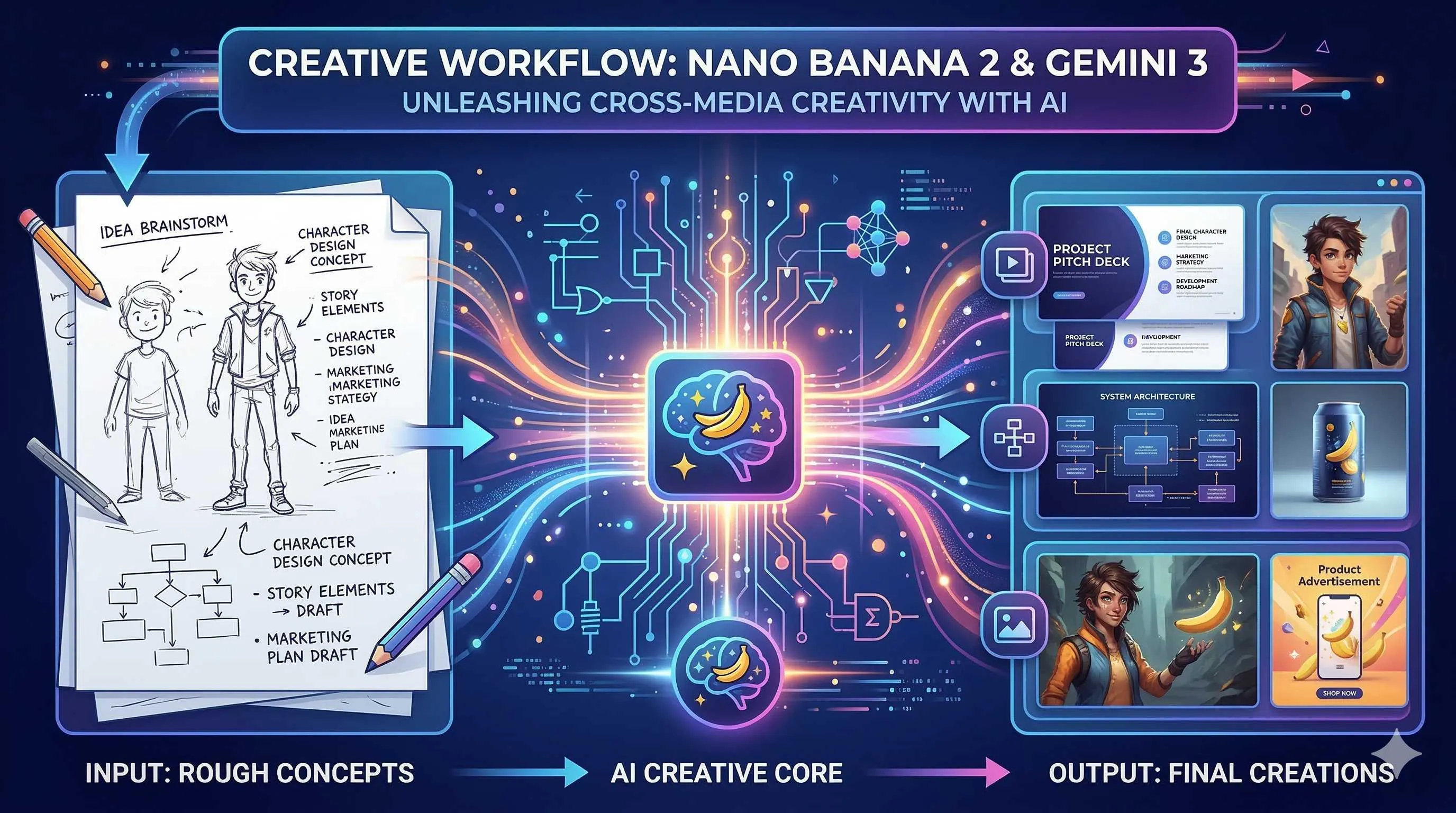
It was Wednesday afternoon when my boss suddenly @mentioned me in the group chat: “Investor presentation tomorrow morning. Need 20 slides explaining our product’s technical architecture and market prospects.”
I stared at that message with only one thought in mind: I’m doomed.
Twenty high-quality slides require structure, content, visuals, and layout. The old way meant an all-nighter—writing outlines, finding assets, adjusting colors, aligning those text boxes that never quite align.

But that night, I did something different.
I opened NotebookLM, uploaded several product documents, and said: “Based on these materials, generate an investor presentation outline, focusing on technical architecture and market prospects.” Ten minutes later, the outline was ready.
Then I opened Gemini 3, called up Nano Banana 2: “Generate a system layer diagram for the technical architecture section, blue tech style, 4K resolution.” The image was generated.
Finally, I used the Google Slides API to automatically stitch everything into a complete presentation. From receiving the task to completion, it took less than two hours total.
In that moment, I realized: Creative workflows are undergoing fundamental change. No longer “humans do everything,” but “humans define direction, AI executes across media.”
This article is about this new workflow—from sketches to slides, from text to visuals, how Nano Banana 2 and Gemini 3 are reconstructing the creative process.
Nano Banana 2: Google’s New Benchmark in Image Generation
Let’s talk about this newly released Nano Banana 2 first.
On February 26, 2026, Google officially launched Nano Banana 2, the latest upgrade following the original Nano Banana in late 2025 and the Pro version in November. Technically, it’s Gemini 3.1 Flash Image, but with significant performance improvements.
Key features:
Faster Speed: Compared to the Pro version, Nano Banana 2 greatly improves generation speed while maintaining high quality. This is crucial for scenarios requiring batch visual asset generation.
Flexible Resolution: Supports multiple resolutions from 512px to 4K, handling various aspect ratios. Need a 16:9 landscape for slide covers? No problem. Want a square for social media? Also no problem.
Character Consistency: This is a lifesaver for series content. You can generate a set of images maintaining consistent characters and styles, perfect for product storylines or brand visuals.
Built-in SynthID Watermarking: Google’s AI content identification technology automatically adds invisible watermarks to generated images for easy recognition and traceability.
In short, Nano Banana 2 isn’t a toy—it’s a production-grade tool.
From Text to Visuals: Natural Language-Driven Image Generation
What’s the traditional image creation workflow?

Designer understands requirements → finds references → sketches → digital production → revisions → final approval. One image might take hours or even days.
Nano Banana 2 bridges the gap between steps one and four. Now you can directly describe the scene you want in natural language.
For example. I needed a “data flow” concept image for the technical architecture page. Previously, I’d have to explain to a designer at length; now I input into Gemini 3:
“Generate an abstract technical architecture diagram showing data flowing from edge devices to cloud processing centers. Use deep blue and electric blue gradients with tech-inspired lines and nodes. 4K resolution, 16:9 ratio. Style reference modern SaaS product website visuals.”
Thirty seconds later, I had usable assets. Maybe not 100% perfect, but sufficient for drafts or concept validation.
Prompt Engineering Tips
- Describe style specifically: Instead of “good looking,” say “flat illustration style” or “3D rendered texture”
- Specify use case: “For PPT background,” “suitable as icon,” “good for cover image”
- Control color scheme: Give exact colors like “brand blue #1E90FF with white”
- Reference pointing: “Similar to Apple event visual style,” “like Notion website illustrations”
From Sketches to Finished Products: Dual Automation of Visual + Logic
Text-to-image is just the first step; more interesting is the “sketch-driven” workflow.
Imagine this scenario: You draw a sketch in your notebook—a few boxes, some lines, labeled “user layer,” “API layer,” “data layer.” Take a photo and upload it to Gemini 3, saying: “Based this architecture sketch, generate a professional product architecture diagram using enterprise SaaS visual style, add appropriate icons and decorations.”
Gemini 3 understands the logical structure of the sketch; Nano Banana 2 generates visual presentation matching the description. The sketch’s “intent” is preserved while the execution is upgraded.
This “visual + logic” dual automation relies on Gemini 3’s multimodal capabilities. It doesn’t just see images—it understands the logical relationships within them, then generates new visual output combined with text instructions.
In practice, this workflow is particularly suitable for:
- Rapid prototyping: Quickly sketch ideas on paper, AI helps convert to professional visuals
- Team collaboration: Product managers sketch, designers refine with AI, efficiency doubled
- Iterative optimization: Generate version → annotate changes → regenerate, several rounds to usable state
Automated Slides: NotebookLM + Google Slides
Images ready, next step is organizing them into a complete presentation.
Here’s the tool combination: NotebookLM and Google Slides API.
NotebookLM takes scattered content (documents, PDFs, web pages) and organizes it into structured narratives. For example, throw in product requirement documents, technical whitepapers, market research reports, then say: “Generate an investor presentation structure outline with key points for each page.”
NotebookLM will:
- Extract core information
- Organize into logically clear page structures
- Generate titles and bullet points for each page
Next, use Google Slides API to automatically create slides. You can write a script:
from googleapiclient.discovery import build
from google.oauth2 import service_account

# Authentication
service = build('slides', 'v1', credentials=creds)

# Create presentation
presentation = service.presentations().create(
    body={'title': 'Product Technical Architecture'}
).execute()
presentation_id = presentation.get('presentationId')

# Batch add slides
for slide_content in notebooklm_outline:
    service.presentations().batchUpdate(
        presentationId=presentation_id,
        body={'requests': [{
            'createSlide': {
                'slideLayoutReference': {
                    'predefinedLayout': 'TITLE_AND_BODY'
                }
            }
        }]}
    ).execute()
    # Add Nano Banana 2 generated images...
The complete workflow becomes:
- NotebookLM analyzes content → generates outline and copy
- Nano Banana 2 generates supporting visuals → provides visual assets
- Google Slides API auto-layouts → outputs finished product
Work that originally required a designer + copywriter + several hours can now be completed by one person in dozens of minutes for a first draft.
Future Trends: Paradigm Shift in Creative Work
After all this, what does this workflow really mean?
I see three levels of change:
Level 1: Efficiency Gains
This is the most direct. Work that used to take days now takes hours or even dozens of minutes for a first draft. Humans aren’t working faster—they’re delegating execution to AI while focusing on judgment and refinement.
Level 2: Lower Barriers
Not everyone is a designer, but everyone needs to make presentations. The Nano Banana 2 + Gemini 3 combination allows non-professionals to produce “good enough” visual content. Design is no longer exclusive to a select few.
Level 3: Paradigm Shift
This is the most profound impact. Traditional workflows are linear: write content first, then create images, finally layout. Each step depends on the previous one being complete.
New workflows are parallel and iterative. You can generate visual exploration directions first, then adjust content structure accordingly; you can try multiple visual styles simultaneously, quickly compare and choose; you can have AI generate multiple versions while humans make final selections.

The core of creative work shifts from “execution” to “curation”—not handcrafting every element, but defining direction, selecting options, and adjusting details.
Of course, this doesn’t mean designers will become obsolete. On the contrary, top designers’ value becomes more prominent—their aesthetic judgment, creative conceptualization, and brand understanding become the “meta-skills” for guiding AI. Repetitive execution work? Leave it to the tools.
Conclusion
Back to that Wednesday afternoon.
If I had followed the old method, that night would definitely have been spent working overtime on the PPT. But using the new workflow, I not only completed the task on time but also had time to rehearse and prepare for Q&A.
The presentation the next day went smoothly. For several technical details investors asked about, I could quickly flip to the corresponding architecture diagrams to explain. Those images weren’t random stock assets—they were customized for our product with clear logic and professional presentation.
That’s what I want to say: Nano Banana 2 and Gemini 3 aren’t just tools—they’re new creative partners. They won’t replace your creativity, but they’ll make your creativity manifest faster and more easily.
If you haven’t tried this workflow yet, I suggest starting with a small project. Like that team sharing PPT for next week—try using NotebookLM to generate the outline and Nano Banana 2 to create a few supporting images, see how it goes.
It might not be perfect the first time. But you’ll be surprised at how, when AI takes on the burden of execution, you can focus your energy on what really matters—telling good stories, conveying ideas, moving your audience.
And that is the essence of creation.
FAQ
What is Nano Banana 2, and how is it different from previous image generation models?
Key upgrades include:
• **Faster speed**: Significantly improved generation speed compared to Pro version, suitable for batch production
• **Flexible resolution**: Supports multiple resolutions from 512px to 4K, various aspect ratios
• **Character consistency**: Can generate series of images maintaining character and style consistency
• **SynthID watermarking**: Built-in AI content identification for easy recognition and traceability
Compared to earlier models, Nano Banana 2 has upgraded from "toy" to "production-grade tool," better suited for commercial application scenarios.
How do you write good prompts for Nano Banana 2?
**Describe style specifically**:
• Instead of "good looking," say "flat illustration style" or "3D rendered texture"
• Specify art style: "cyberpunk," "minimalist," "art nouveau"
**Define use case clearly**:
• "For PPT background, needs white space for text"
• "Suitable for app icon, simple and recognizable"
**Control color scheme**:
• Give exact colors: "brand blue #1E90FF with white"
• Describe atmosphere: "warm earth tones," "cool blue-purple gradient"
**Reference pointing**:
• "Similar to Apple event visual style"
• "Like Notion website illustration quality"
The more specific the description, the more the output matches expectations.
What is the sketch-driven AI generation workflow?
1. **Hand-draw sketch**: Draw idea structure on paper (boxes, arrows, labels)
2. **Photo upload**: Take photo of sketch with phone, upload to Gemini 3
3. **Describe requirements**: Explain desired style and use case
4. **AI generation**: Gemini understands sketch logic structure, Nano Banana 2 generates professional visual
5. **Iterative optimization**: Annotate modification requests, regenerate
Advantages of this workflow:
• Preserves sketch "intent," upgrades "execution"
• Product managers can quickly validate ideas
• Designers can start from refinement rather than drawing from scratch
• Several iteration rounds yield usable results
How do NotebookLM and Google Slides API combine to achieve automated slide creation?
**NotebookLM stage**:
• Upload product documents, technical whitepapers, and other source materials
• Instruction: "Generate investor presentation outline, focus on technical architecture and market prospects"
• Output: Structured page outline and key points per page
**Nano Banana 2 stage**:
• Generate supporting visual assets for each page of content
• Choose different styles based on page type (cover images, charts, supporting images)
**Google Slides API stage**:
• Call API to create new presentation
• Batch add slide pages
• Insert copy generated by NotebookLM
• Insert images generated by Nano Banana 2
• Automatically apply layouts and formatting
Final output: Complete structure, substantial content, visually professional presentation draft that only needs minor human adjustments to use.
What does AI automation mean for creative professionals?
**Efficiency level**: Execution speed greatly improved, repetitive labor delegated to AI, humans focus on judgment and refinement
**Barrier level**: Non-professionals can also produce "good enough" visual content; design is no longer exclusive to a select few
**Paradigm level**: Shift from linear workflows to parallel iterative workflows
• Can explore multiple visual directions simultaneously
• Rapid generate-select-optimize cycles
• Creative core shifts from "execution" to "curation"
**Impact on designers**:
• Basic execution work decreases
• Aesthetic judgment, creative conceptualization, brand understanding and other "meta-skills" become more valuable
• Top designers become "directors" of AI rather than "draftsmen"
Key insight: AI doesn't replace creativity—it makes creativity land faster.
8 min read · Published on: Feb 28, 2026 · Modified on: Mar 18, 2026

Related Posts
OpenClaw 2026.3 Advanced Practice: Core Features and Best Practices

OpenClaw 2026.3 Advanced Practice: Core Features and Best Practices
OpenClaw Practical Guide: From Beginner to Master

OpenClaw Practical Guide: From Beginner to Master
Don't Be a Prisoner of a Single Model: Flexibly Switching Between Gemini 3, Claude 4.5, and GPT-OSS in Antigravity

Comments
Sign in with GitHub to leave a comment